Backup
EnterpriseBacula Enterprise Only
This solution is only available for Bacula Enterprise. For subscription inquiries, please reach out to sales@baculasystems.com.
The backup process allows you to perform in two different environments: external or internal. The external process allows full clone backups or snapshots, and incremental or differential backups. The internal process allows full backups to be performed faster than the external processes.
Backup from RHV environment external machine
The next backups methods (clone, snapshot, template) perform a download of the VM’s disks through the API. These methods are slower than the ’Proxy VM’ method, but they do not depend on a virtual machine in the RHV environment.
The general backup process of a virtual machine is as follows (check also Figure External backup diagram):
Check for the existence of the virtual machine to protect and the compatibility of the RHV environment with the chosen backup method (check ref:RHVPluginLimitations).
If it is not a template backup:
Check the snapshots:
If the last backup was incomplete and the generated snapshot was not removed successfully.
If apply a full backup in a virtual machine with incremental snapshots.
Lauch a snapshot.
If it is a clone backup:
Clone the virtual machine using the created snapshot.
Download configuration of the original virtual machine and cloned machine (XML).
Download all disks of cloned machine.
If it is a template backup:
Download configuration of template (XML).
Download all disks of template.
If it is a snapshot backup:
Download configuration of virtual machine (XML).
Download all virtual machine snapshot disks.
If it is a backup clone:
If necessary, remove clone machine.
If it is not a template backup and cbt is off:
Remove snapshot.
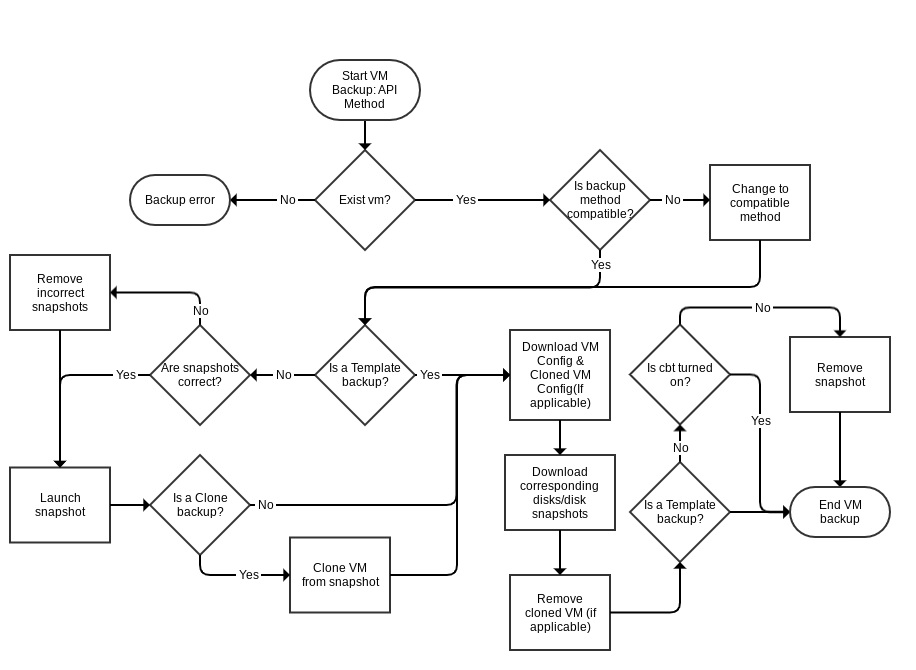
External backup diagram
Incremental and Differential Backups
Incremental Backup Process
An incremental backup is one in which successive copies of the data will contain only the portion of the disk(s) that has changed since the previous backup was performed. When a full recovery is needed, the restoration process will need the last full backup plus all the incremental backups up to the point of restoration. Incremental backups are often desirable as they reduce storage space usage, and are quicker to perform than full or differential backups.
The method to perform incremental backups used by this plugin is as follows:
CBT function is activated in the fileset.
The first FULL will leave the snapshot, which it created during backup, in the machine.
Each Incremental will perform a new snapshot, take the data from that new snapshot (which will contain the difference between the current state and the snapshot immediately before) and eliminate the snapshot created by the previous Incremental backup.
The disadvantages of this process are the following:
A longer time is required during a restore since the Full and all Incrementals will need to be read.
It is recommended to perform closed cycles that are not very long with the following sequence: 1 FULL + X INCREMENTAL, with ’X’ being the number of backups in the chain. This recommendation is due to the fact that in each iteration that performs an incremental backup the snapshot that is maintained in the virtual machine is larger, and therefore the operations carried out with it will take longer and longer, and more data will be stored. (See Table A normal incremental backup).
Differential Backup Process
CBT function is activated in the fileset.
The first FULL will leave the snapshot, which it created during backup on the machine. This full snapshot will be present in all differential backup processes until a new full is performed.
Each differential will make a new snapshot. It will take the data of that new snapshot (which will contain the difference between the Full and the current state) and eliminate the snapshot at the end.
The advantages of this level of backup over INCREMENTAL are:
Faster restorations.
Unlimited iteration of differential backups without influencing backup performance.
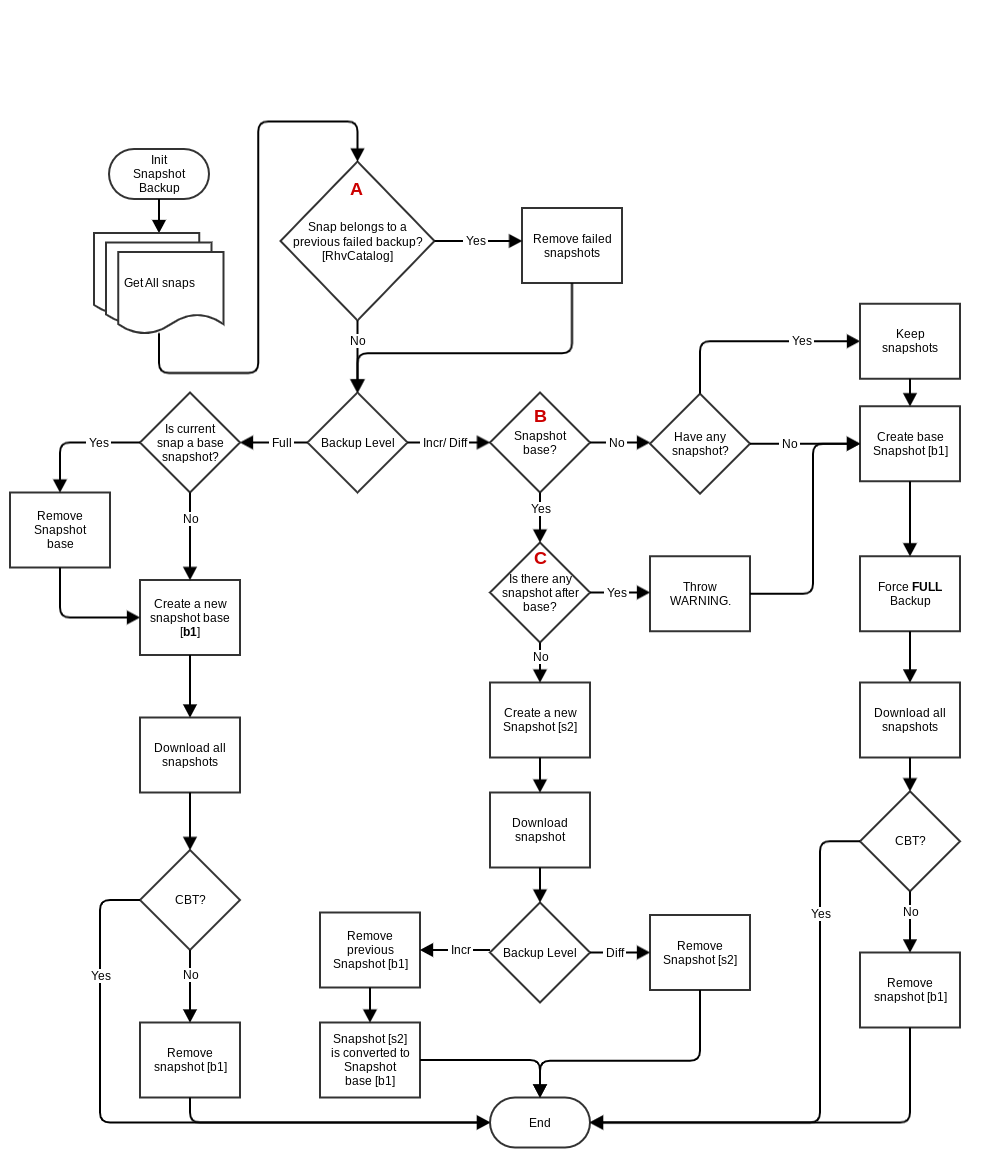
Incremental/Differential backup diagram
In Figure fig:incr-diff-backup-diagram you can see 3 marks with the letters A, B and C. These marks correspond with:
Check previous backups with internal RhvCatalog stored in /opt/bacula/ working/rhv/catalog/{server_parameter}/{vm_id}.json. The function of this catalog is to control the backups of each VM to check if they finish correctly. If this catalog entry doesn’t exist for the VM, the plugin creates it with a FULL backup.
Incremental/Differential backups need a chain of snapshots. The base snapshot is the snapshot of the last Full backup done by the RHV plugin for a virtual machine. The description of the snapshots created by the RHV plugin is backup_{jobId}_{jobName}.
If the snapshot chain is interrupted by any snapshot created outside of the RHV plugin, the RHV plugin must make a COMPLETE backup. The RHV plugin will always keep foreign snapshots.
Use cases in snapshot maintenance
T1 |
T2 |
T3 |
T4 |
T5 |
|
|---|---|---|---|---|---|
Type Backup |
F |
I |
I |
I |
I |
Create snapshot |
S1 |
S2 |
S3 |
S4 |
S5 |
Snapshots in VM |
S1 |
S2 |
S3 |
S4 |
S5 |
T1 |
T2 |
T3 |
T4 |
T5 |
|
|---|---|---|---|---|---|
Type Backup |
F |
D |
D |
D |
D |
Create snapshot |
S1 |
S2 |
S3 |
S4 |
S5 |
Snapshots in VM |
S1 |
S1 |
S1 |
S1 |
S1 |
T1 |
T2 |
T3 |
T4 |
T5 |
|
|---|---|---|---|---|---|
Type Backup |
F |
D |
D |
F |
I |
Create snapshot |
S1 |
S2 |
S3 |
S4 |
S5 |
Snapshots in VM |
S1 |
S1 |
S1 |
S4 |
S5 |
T1 |
T2 |
T3 |
T4 |
T5 |
|
|---|---|---|---|---|---|
Type Backup |
F |
I |
I |
I |
|
Create snapshot |
E1 |
S2 |
S3 |
S4 |
S5 |
Snapshots in VM |
E1 |
E1 + S2 |
E1 + S3 |
E1 + S4 |
E1 + S5 |
T1 |
T2 |
T3 |
T4 |
T5 |
|
|---|---|---|---|---|---|
Type Backup |
F |
I |
I |
I |
|
Create snapshot |
S1 |
S2 |
E3 |
S4 |
S5 |
Snapshots in VM |
S1 |
S2 |
S2 + E3 |
S2 + E3 + S4 |
S2 + E3 + S5 |
I *: Internally, the RHV plugin will do a FULL backup and log a warning.
Backup from RHV environment internal machine
A proxyVM backup is a method where backup is done through a special VM inside the RHV environment. Disks belonging to VMs that need to be backed up will be attached to this special VM and backed up via this proxyVM. This method only allows FULL backups, but is much faster than the other REST API based methods.
The backup process consists of binding to each of the virtual machine disks to perform the backup, backing up of the contents of the disks, then unbinding from them. The binding process is made through a snapshot and an attach operation of the snapshot to the proxy VM.
Backup Cache
This feature keeps VM backups in different storage domains to be used for future restores. This functionality allows faster restores of virtual machines, but requires more space available in the storage domains.
Quiescing VMs
If the guest agent for RHV is installed in a VM, the system will be quiesced automatically and transparently when a snapshot is created. Red Hat’s documentation at redhat.com/…/Live_Snapshots_in_Red_Hat….html provides full information.
Go back to: RHV Plugin: Operations.